.png)
Introducing Workspaces
We are introducing Workspaces, dedicated environments for collaborative matter-specific work. With Workspaces, legal professionals and enterprise teams can now create scoped collections of Assistant threads for specific cases, deals, or projects, connecting matter-relevant files, setting custom instructions, and sharing context seamlessly with colleagues.
What Are Workspaces?
A Workspace is a defined environment for working on a specific matter, case, project, or recurring task. Unlike standard Assistant conversations, which are designed for versatile, ad hoc questions and support for legal and professional work, Workspaces are dedicated to a particular matter, ensuring that all analysis, research, and collaboration remain structured and accessible to relevant colleagues and departments.
Scoped Context
Workspaces enable the centralised provision of matter-specific sources through the Workspace files repository and templates.
Workspace Files
Upload matter-specific documents, contracts, briefs, memos, discovery materials, transaction documents, and expert reports to the Workspace file repository. When you work within that Workspace, casepal conducts Workspace Search, a targeted retrieval that searches exclusively through these files using frontier semantic and keyword search. This ensures research remains focused on matter-relevant sources.
Workspace Templates
Provide reference documents, standard templates, style guides, or authoritative documentation in their entirety. These are particularly valuable for drafting and review tasks, where the full context of a template document is required. Templates remain accessible across all chats within the Workspace without requiring repeated uploads.
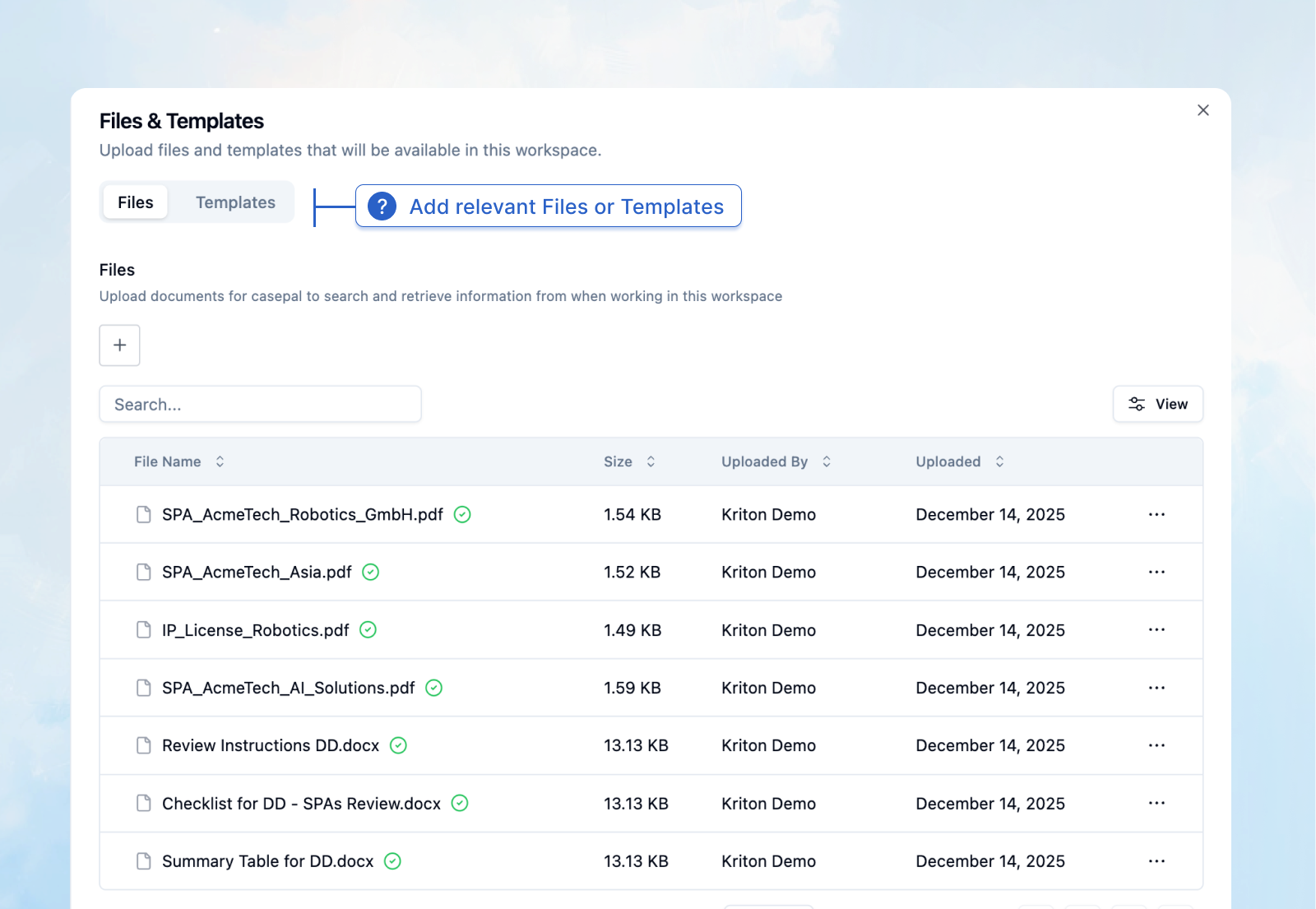
Together, these mechanisms create a comprehensive knowledge environment focused on the specific requirements of each case, transaction, task, or project.
Custom Instructions
Custom instructions function as matter-level system prompts, enabling you to define how casepal approaches tasks relevant to that Workspace. Establish jurisdictional frameworks, party identifications, analytical approaches, output formats, and recurring protocols that persist across all conversations and apply to all team members of that Workspace.
For example, in a cross-border M&A transaction, you might instruct casepal to always analyze contractual provisions under both Delaware law and German law, reference specific internal precedents, and format responses as deal memos. These instructions persist across all chats and to all colleagues working within that Workspace, improving consistency and further customising your experience with casepal to the needs of your organization.
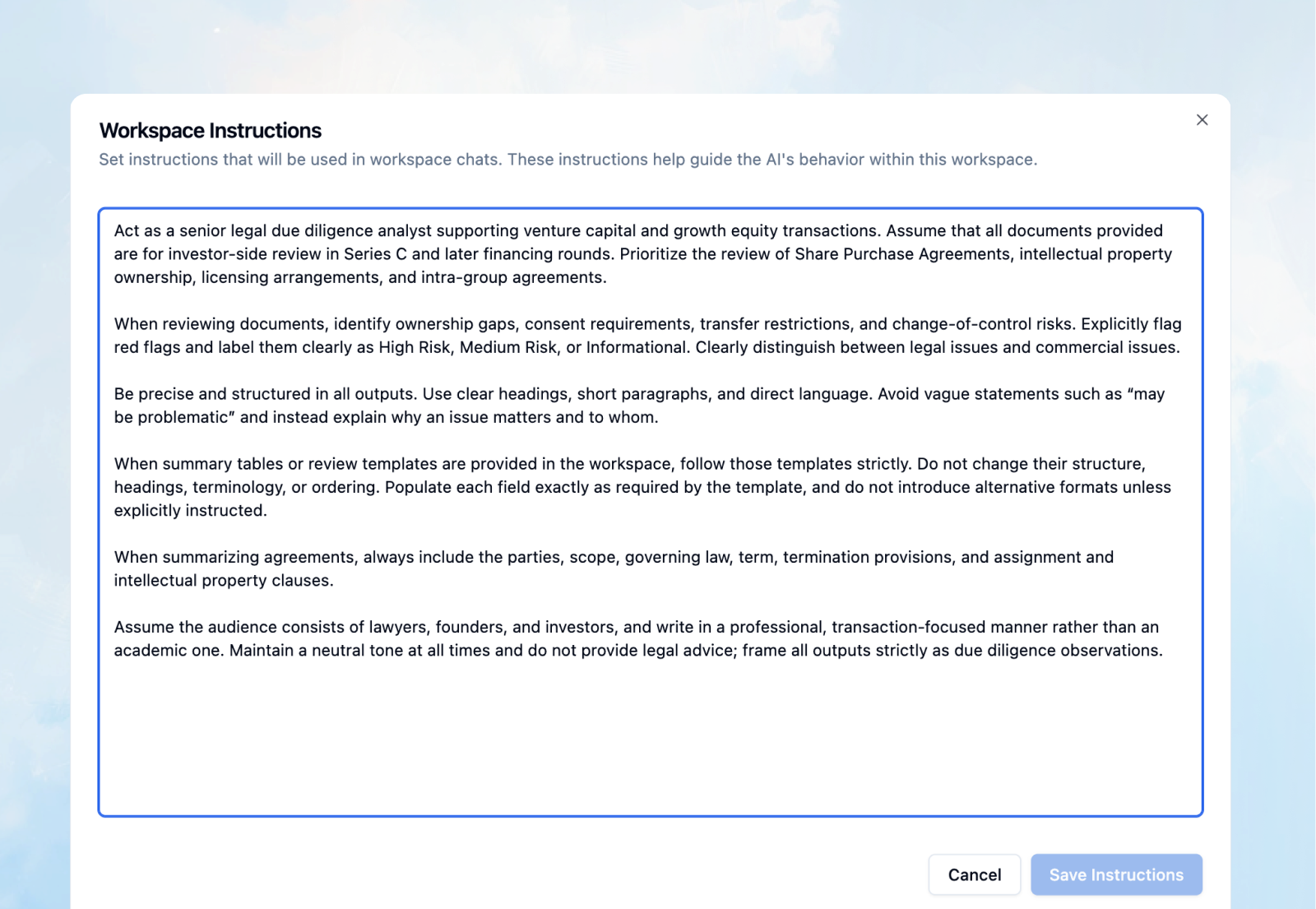
All Workspace management functionality: adding files, updating custom instructions, and inviting team members is accessible directly within each Workspace chat. For example, you can upload a new expert report mid-conversation, refine your instructions as priorities shift, or add a colleague to the Workspace without interrupting your workflow.
Contextual Memory Across Conversations
Workspaces maintain contextual memory of key facts, parties, dates, and matter-specific details across all chats. By providing the relevant context through files and custom instructions, casepal already reasons in consideration of the essential context, removing the need for manual repetition across your team.
Multiple Conversations Organised
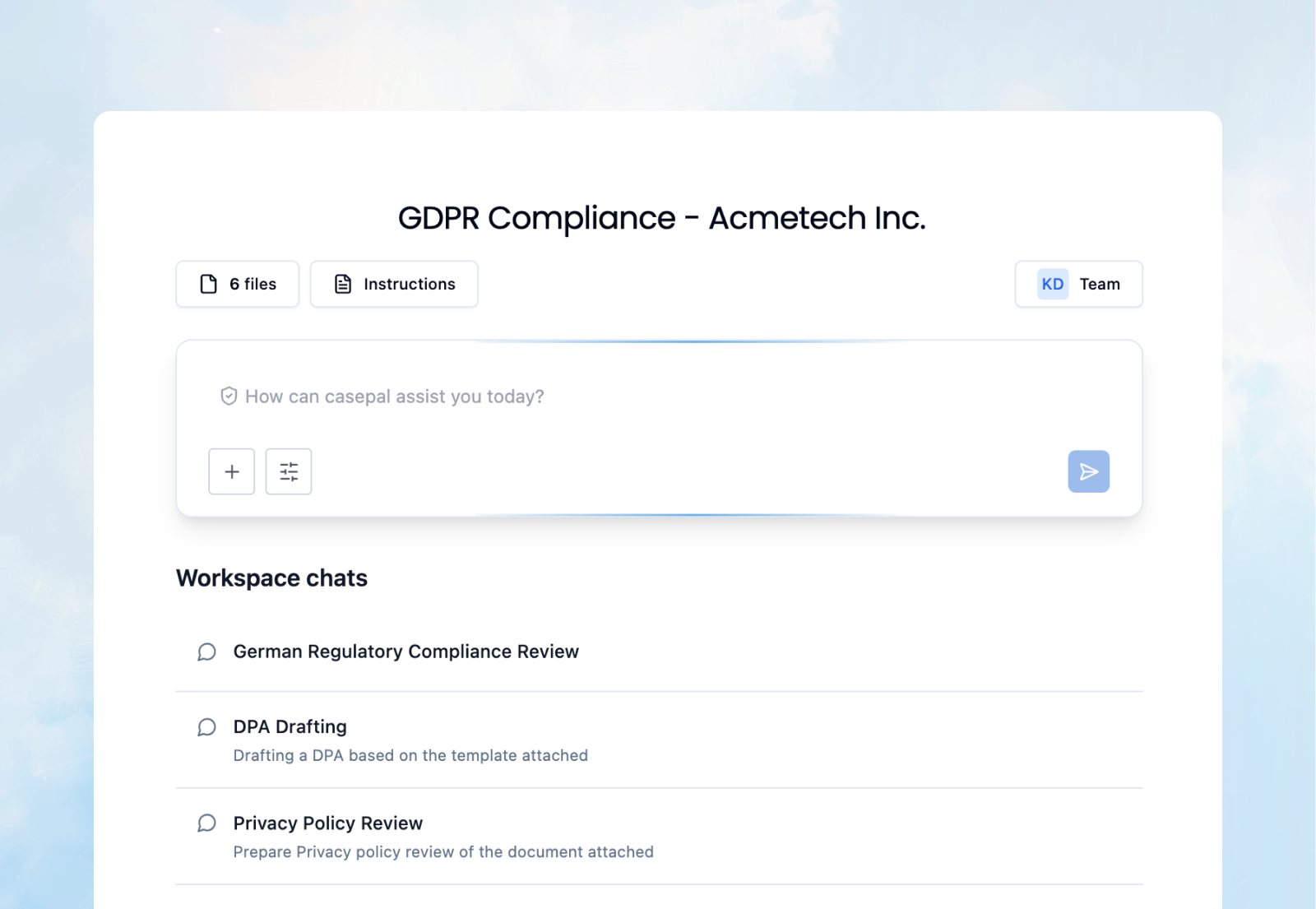
Create separate conversation threads within a single Workspace, each inheriting the same sources, custom instructions, and contextual memory. Compartmentalize different aspects of a matter. For example, in a case involving a specific client's GDPR compliance, one chat can be for Privacy policy review, another for drafting a DPA, and another for privacy-related national regulatory compliance analysis, all within one workspace that maintains a unified matter-specific context and modus operandi.
This structure keeps work focused and accessible without excessively fragmenting matter-specific knowledge and instructions.
Team Collaboration
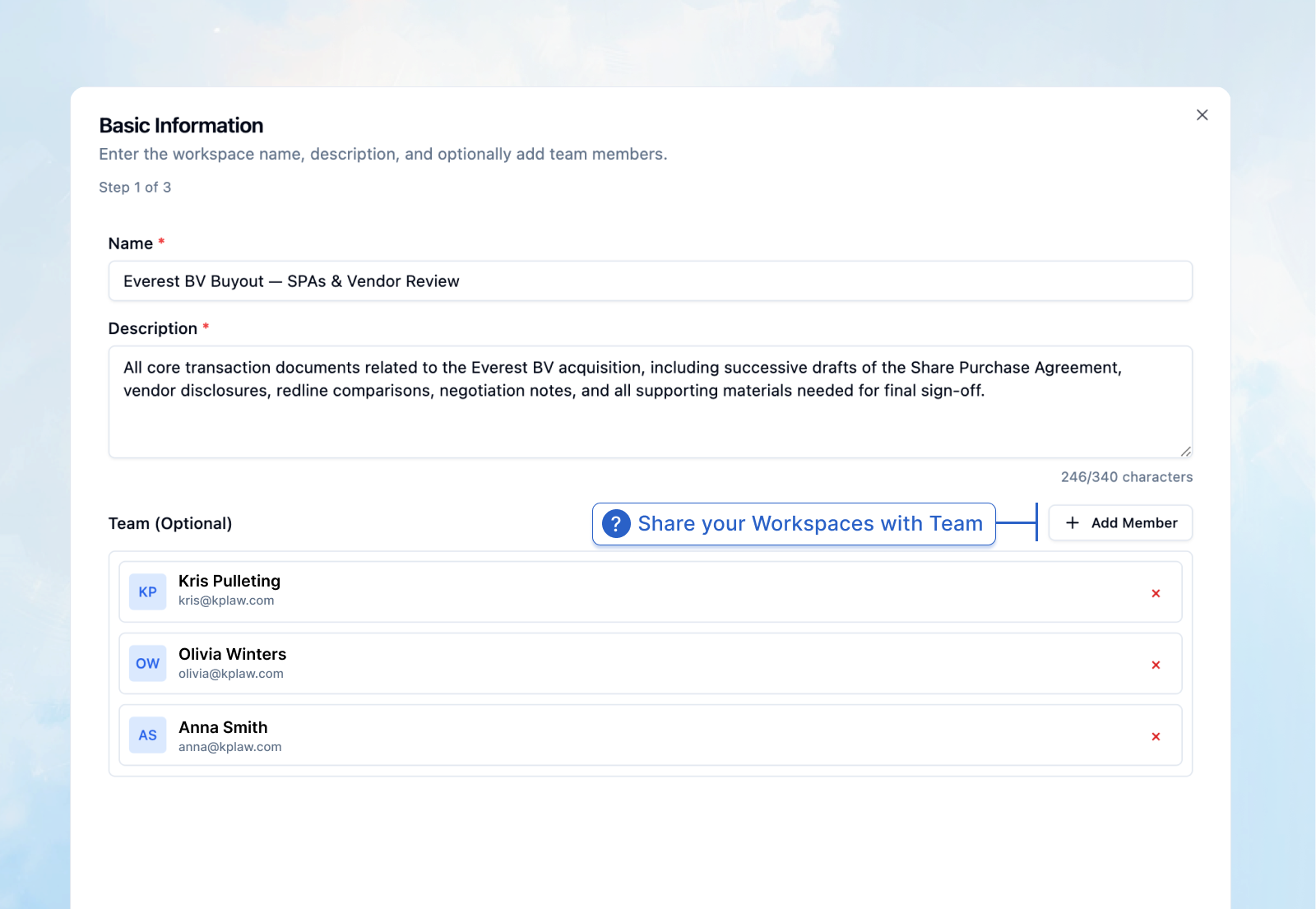
Share Workspaces with colleagues for seamless collaboration. Team members gain access to the connected sources, custom instructions, and contextual memory, enabling centralized matter-specific knowledge.
Leverage Internal Expertise
Workspaces enable your most experienced colleagues to create ready-to-use environments for the team. An experienced user configures the Workspace with the right sources and instructions, then shares it with colleagues who immediately benefit from that structure without needing to master prompt engineering or context management themselves. This creates a force multiplier: one team member's expertise in deploying casepal effectively becomes accessible across the entire matter team.
Ensure Work Alignment
When multiple professionals work simultaneously on different aspects of the same matter — one on due diligence, another on drafting, another on regulatory analysis— shared Workspaces ensure everyone references the same sources, follows the same protocols, and builds on each other's work in real time rather than working in isolation.
Integration with Agentic Legal Research
Workspaces seamlessly integrate with Agentic Legal Research and Library Search, while further expanding casepal’s agentic capabilities with Workspace Search, creating a unified research environment that combines matter and organisation-specific knowledge with external legal primary and secondary sources.
When you conduct research within a Workspace, casepal determines strategy based on your query and our research protocols: searching your matter-specific files, retrieving external legal authorities, and synthesizing findings through comprehensive reasoning and analysis that is grounded directly in your institutional knowledge and applicable law.
For example, before analyzing whether a contractual clause complies with regulatory requirements, casepal first searches your Workspace and organization Library for the relevant contract template, accepted terms, or playbooks, and second, the applicable regulation from official governmental sites.
Professional Applications
Cross-Border M&A Transaction Management
Create a Workspace for an acquisition, connect due diligence materials and transaction documents, define custom instructions for multi-jurisdictional analysis (e.g., Belgian and German law), and collaborate with cross-functional teams across legal, tax, and compliance. Separate chats address due diligence, drafting, regulatory approvals, and tax structuring, all operating within a unified transaction knowledge base.
Litigation Matter Organization
Scope a Workspace to a specific case, connect pleadings, discovery materials, and relevant legal research. Set custom instructions for jurisdiction-specific legal standards, party names, and procedural requirements. Use multiple chats for motion practice, discovery strategy, settlement analysis, and trial preparation, maintaining a unified factual and legal record across all conversations, while providing access to all your colleagues working on that case.
Regulatory Compliance Programs
Deploy Workspaces for compliance projects organized by regulation or jurisdiction. Connect regulatory texts, internal policies, and audit materials. Define custom instructions for gap analysis and remediation tracking. Share the Workspace with compliance officers, in-house counsel, and external advisors to create a centralized knowledge base for your organization’s compliance program.
In-House Counsel: Recurring Contract Review
Create Workspaces for standardized legal workflows, such as customer agreement reviews or vendor contract negotiations. Connect your company's standard templates, negotiation playbooks, and approved clause libraries. Define custom instructions for risk thresholds and escalation criteria. Sales team members and junior legal staff receive consistent, high-quality contract analysis aligned with your company's risk framework.
Unlock your organization’s knowledge and expertise
More Organized – Separate work by matter, keeping context clean and focused. Your general Assistant conversations remain distinct from case-specific ot task-specific workflows.
More Precise – Targeted search through matter-relevant sources. By scoping retrieval to Workspace files and templates, casepal delivers higher performance in matter-specific retrievals.
Customizable – Tailor casepal's behavior per Workspace without affecting your global Assistant settings. Create analytical approaches, output formats, and citation standards to the specific requirements of each matter.
Collaborative – Team access to shared context, sources, and instructions creates institutional knowledge accessible across the matter-relevant team.
With Workspaces, we demonstrate our focus on enabling legal professionals and enterprise teams to collaborate on complex work with greater structure, precision, and shared institutional knowledge.